
Prepare your WooCommerce store for AI-powered search platforms with the AI Schema & GEO plugin and boost your sales by improving AI search. Automatically optimize your store with accurate Product structured data, AI-friendly schema, Open Graph metadata, AI crawler controls, and GEO-focused features designed to improve how your products and business are understood by AI-powered platforms. Shoppers no longer start every purchase on Google. They ask ChatGPT which laptop bag fits a 15-inch screen, let Perplexity compare prices, or have Claude summarize the options. Those assistants never browse a store the way a person does: they read structured data, fetch plain-text summaries, and send their own crawlers. WooCommerce AI Schema & GEO Plugin prepares your shop for exactly that audience. It completes the product schema WooCommerce already prints instead of duplicating it, serves a live llms.txt catalog of your products, adds Open Graph tags where no SEO plugin does, and lets you decide which AI crawlers may read your pages. The result is a store that AI engines can understand, quote, and recommend with confidence. If you have any problems with our plugin, require additional features, or have any suggestions, contact us on the plugin support forum: Support Forum.
Visibility in AI Search
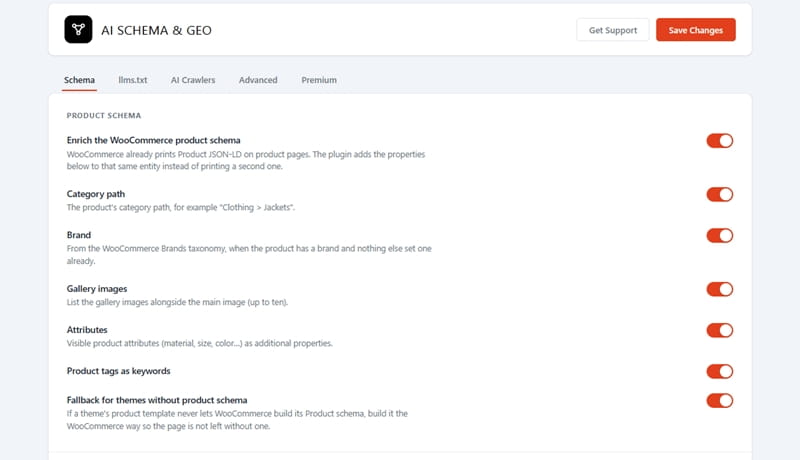
The plugin extends the Product entity WooCommerce builds with the category path, brand, gallery images, visible attributes, and tags, so every product page carries one consistent description instead of two conflicting ones.
The llms.txt and llms-full.txt feeds list your catalog with prices and availability in the format assistants look for at the site root, and the premium JSON catalog and REST route hand the same data to AI agents.
AI Crawler Controls
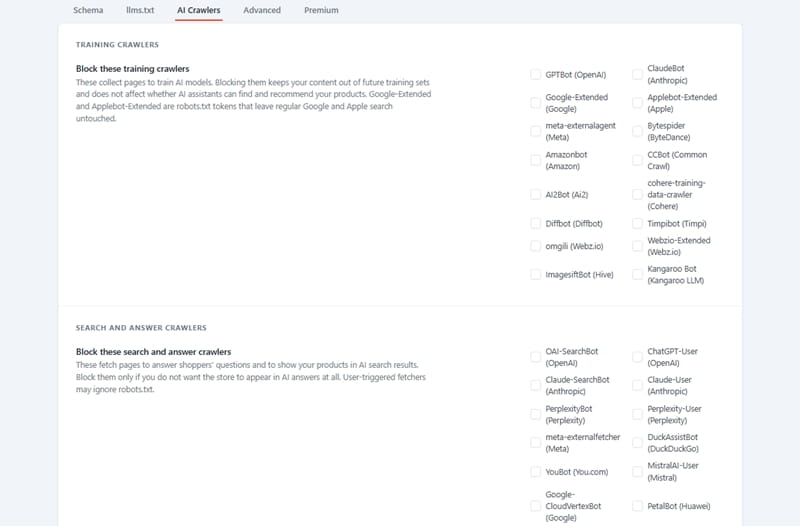
Not every AI crawler serves the same purpose, so the WooCommerce AI Schema & GEO plugin keeps them apart. Training crawlers collect pages to build models; blocking them keeps your content out of future training sets without affecting whether assistants can find your products.
Search and answer crawlers fetch pages to answer shoppers, and the settings screen warns you before you block those. Each choice becomes a robots.txt directive, and status cards tell you when a physical robots.txt file would override it.


AI Schema & GEO
GEO Readiness Audit
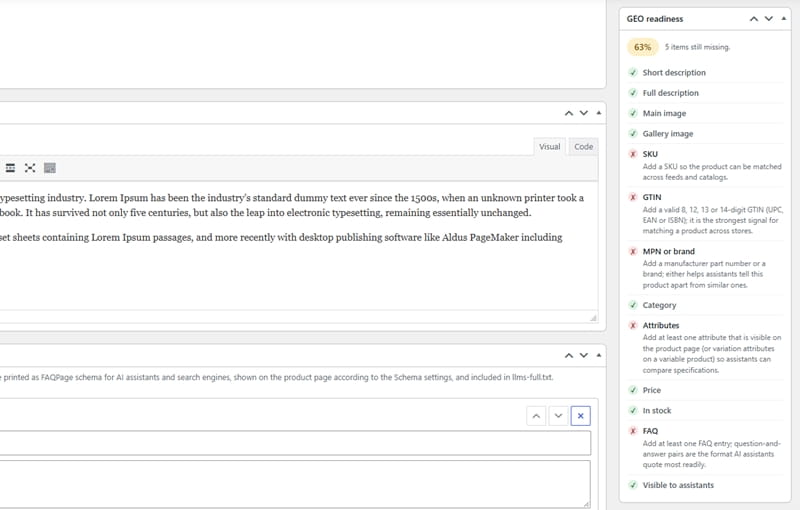
WooCommerce AI Schema & GEO Premium adds a readiness score to every product. A weighted checklist looks at what an AI assistant needs to recommend an item with confidence: a short and a full description of useful length, a main image and a gallery, SKU, GTIN, MPN, etc.
The products list shows the percentage as a sortable column, so the weakest entries surface first, and the product edit screen shows the same checklist with a plain hint for every missing item. Fix the gaps, save the product, and the score updates.
AI Crawler Analytics
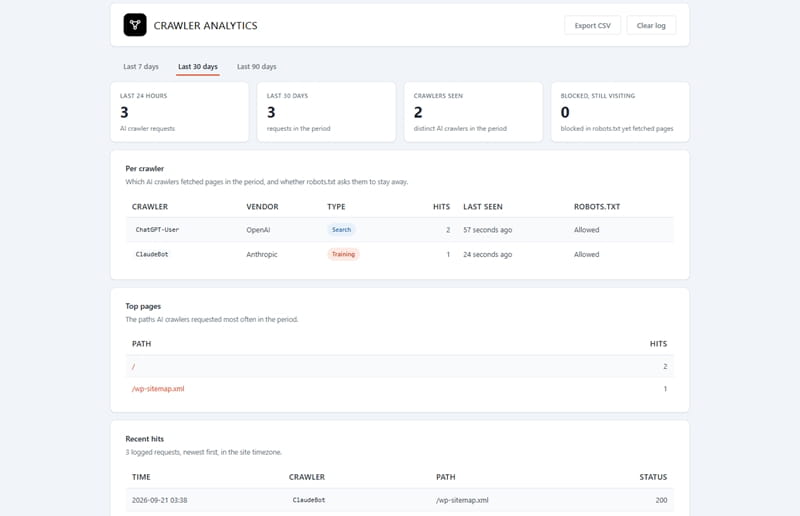
The plugin records every page request coming from known AI crawlers and displays the data on a dedicated analytics screen: the number of requests over the past 24 hours and for a selected period, a list of detected crawlers, the most frequently requested pages, and the latest requests with response status.
A per-crawler table marks each visitor as training or search and shows whether robots.txt blocks it, so a crawler that ignores your block stands out. The log keeps only the crawler name, the page path, the status, and the time, never IP addresses or user-agent strings, and prunes itself after the retention window you choose.
WooCommerce AI Schema & GEO Features
The free version enriches the WooCommerce product schema, adds an OnlineStore entity, prints product Open Graph tags with automatic SEO-plugin detection, publishes cached llms.txt and llms-full.txt feeds with per-product exclusion, and manages training and search crawlers in robots.txt. Premium version builds on that with MPN and brand fields, one nested offer per variation, a product FAQ shown as a tab or below the tabs and printed as FAQPage schema, configurable return and shipping policies, breadcrumb schema for block themes, the llm-catalog.json feed, a paginated REST API with an optional key, the GEO readiness audit, and crawler analytics with CSV export.
The AI Schema & GEO plugin is available in two editions: Free and Premium. The Premium edition includes the complete set of premium features and is available in three licensing plans: Personal, Business, and Developer. All plans provide the same features; the only difference is the number of websites they cover: Personal for 1 website, Business for up to 5 websites, and Developer for unlimited websites.
We accept Credit Cards, PayPal, and Debit Cards payments!
Detailed List of Features
- WooCommerce HPOS Compatibility
- Translation-Ready & Multisite-Aware
- Enhanced WooCommerce Product Schema
- Product Open Graph Tags
- Dynamic & Customizable /llms.txt
- Products to Display & Ordering in /llms.txt
- Dynamic & Customizable Product Schema
- Fallback for Themes Without Product Schema
- OnlineStore Schema on the Front Page
- Training Crawlers
- Search and Answer Crawlers
- Smart Feed Caching
- GEO Readiness Audit Premium
- AI Crawler Analytics Premium
- Product Identifiers Premium
- Variable Product Offers Premium
- Product FAQ Schema Premium
- Merchant Policies Schema Premium
- Shipping Details in Schema Premium
- BreadcrumbList Schema Premium
- Log AI Crawler Visits Premium
- More Control on Training Crawlers Premium
- More Control on Search & Answer Crawlers Premium
- Priority Support Premium
Video Manual
AI search is becoming a normal way to shop, and stores that speak its language get quoted while the others get skipped. WooCommerce AI Schema & GEO plugin gives your shop that language without rebuilding anything: it works with the data WooCommerce already holds, adds only what is missing, respects your SEO plugin, and never sends a request to an outside service. Start with the free version and check your llms.txt feed within a minute of activating it. When you want exact variation offers, product FAQs, merchant policies, a JSON catalog, and a clear view of which AI crawlers visit your store, the premium add-on is one upload away.
Below you can watch a short video tutorial.
User Manual
Step 1: Installing and activating the free version
- Make sure WooCommerce is installed and active; the plugin needs it and will show a notice otherwise.
- In your WordPress admin, go to Plugins → Add New, search for "WDA AI Schema & GEO for WooCommerce" and click Install Now, or upload the ZIP file you downloaded from this page (you can download the plugin by clicking the Download button in the pricing table).
- Click Activate. A one-time notice points you to the new AI Schema & GEO menu. The defaults are already working: the product schema is enriched, the feeds are published, and Open Graph tags are printed.
- Open yourstore.com/llms.txt in a browser to see the feed, and view the source of any product page to find the enriched Product entity inside the JSON-LD block that WooCommerce prints.
Step 1.1: Installing and activating the premium version
- Keep the free plugin installed and active. The premium add-on requires it (version 1.0.0 or newer) and stays inactive with a notice if it is missing.
- Once you purchase the premium version, you will be able to download the premium version ZIP file. Go to Plugins → Add New → Upload Plugin, choose the file, and click Install Now, then Activate.
- Open AI Schema & GEO → Settings. The premium options sit on the tab of the feature they extend, and the Premium tab shows the status of every module. A new Crawler Analytics entry appears in the menu.
The settings screen
All settings live under AI Schema & GEO → Settings. Each tab saves on its own, and Reset Defaults restores only the tab you are on.
- Schema. Switch the schema enrichment on or off as a whole, choose which properties to add (category path, brand, gallery, attributes, keywords), keep the fallback for themes that print no product schema, enable the OnlineStore entity and write a store description, and set the Open Graph mode. "Automatic" prints the tags only when no SEO plugin does. Premium adds the identifier fields, the one-offer-per-variation option, the FAQ display and tab title, the merchant policy fields and the breadcrumb fallback here.
- llms.txt. Publish llms.txt and llms-full.txt, choose how many products to list and in which order, write the feed title and summary, pick the description length and the cache time. The status card shows the live URLs, warns when a physical llms.txt file exists in the site root, and offers a Regenerate feeds button. Premium adds the JSON catalog and REST API switches and the optional API key.
- AI Crawlers. Tick the training crawlers and the search crawlers you want to block; the second list carries a warning because blocking it removes your store from AI answers. The status card shows the resulting robots.txt and tells you when a physical file or the "Discourage search engines" setting makes the directives moot. Premium adds crawler logging and the retention window.
- Advanced. Choose whether the plugin deletes its data when uninstalled, and copy the endpoints and developer hooks. Premium adds the GEO readiness switch.
- Premium. With the add-on active this tab lists every module with its current state and links.
Per-product options
- Hide from llms.txt. On the product edit screen, in the Product data box, open the Advanced tab and tick the box to leave the product out of both feeds and the JSON catalog.
- MPN and brand (premium). In the Inventory tab, right below the SKU and GTIN fields, enter the manufacturer part number and, when the product has no WooCommerce brand, a brand name. Each variation has its own MPN field in the Variations tab; leave it empty to inherit the product's.
- Product FAQ (premium). The Product FAQ box below the editor holds up to twenty question-and-answer pairs. Add, reorder and remove them, then update the product. They are printed as FAQPage schema, shown on the product page in the position chosen on the Schema tab, and added to llms-full.txt. Answers may contain paragraphs, line breaks, lists, links, bold and italic text.
- GEO readiness (premium). The box in the sidebar shows the score and a checklist; every missing item comes with a hint. The same score appears as a sortable column in the products list.
Merchant policies (premium)
On the Schema tab switch on "Return policy in the product schema", enter the countries the policy applies to as ISO codes, choose the return window, fees, methods and refund types, and optionally link your returns page. Switch on "Shipping details" to state a flat rate, the destinations and the handling and transit times. Both are attached to every offer; virtual and downloadable products are skipped. Leave them off until the figures match your real policy. Additionally, our WooCommerce AI Schema plugin is fully GDPR compliant.
Checking the result
- Product schema: open a product page, view the page source and search for application/ld+json, or paste that JSON into the code tab of Google's Rich Results Test or the Schema Markup Validator. Every page carries exactly one Product entity.
- Feeds: open /llms.txt, /llms-full.txt and, with premium, /llm-catalog.json and /wp-json/wda-aisgp/v1/catalog. The feeds are cached and rebuilt whenever a product, price, stock level or category changes.
- Crawler analytics (premium): visit a few product pages while logged out, using a browser whose user agent is set to a crawler string such as GPTBot, then open AI Schema & GEO → Crawler Analytics. Reads of robots.txt are not counted as visits.
Good to know
- A physical llms.txt or robots.txt file in the site root is served by the web server before WordPress runs, so it takes precedence; the status cards tell you when one exists.
- With plain permalinks the feeds are served at query-string URLs, shown on the llms.txt tab. Enable a permalink structure to get /llms.txt.
- Turning off "Enrich the WooCommerce product schema" also stops the premium additions to the Product entity, so the page keeps WooCommerce's entity unchanged.
- The plugins make no requests to external services and store no personal data.